


 Global Top
Item No:14090
1/12 Motorcycle Series No.90
1/12 SUZUKI HAYABUSA 1300 (GSX1300R)

About the Suzuki Hayabusa 1300 (GSX1300R)
In 1998, the Suzuki Hayabusa 1300 (GSX1300R) was quite the sensation during its debut at the "INTERMOTO 98" show in Germany. The Hayabusa is equipped with a 175hp in line 4-cylinder 4 DOHC valve water-cooled engine. To ensure good airflow to the ram air duct, a unique cowling design with vertically positioned twin headlights was adopted. The Hayabusa also realizes quick and powerful acceleration and performs excellent curving as well as effective braking. For expert and average level riders alike the cutting-edge Suzuki Hayabusa 1300 has proven to be rider friendly, and developed around the concept of the "ultimate sports bike" continues to delight riders all over the world.
About the model
1/12 scale, Overall length: 178mm, Overall width: 71mm. From its unique shape to the engine, this model accurately reproduces the real Hayabusa. Parts such as upper cowling and tank are molded as one piece. For engine, cowling, and swing arms screws are used for reliable attachment to the frame. Metallic stickers are used to increase realism of the front fork. Tires are made of real rubber.
In 1998, the Suzuki Hayabusa 1300 (GSX1300R) was quite the sensation during its debut at the "INTERMOTO 98" show in Germany. The Hayabusa is equipped with a 175hp in line 4-cylinder 4 DOHC valve water-cooled engine. To ensure good airflow to the ram air duct, a unique cowling design with vertically positioned twin headlights was adopted. The Hayabusa also realizes quick and powerful acceleration and performs excellent curving as well as effective braking. For expert and average level riders alike the cutting-edge Suzuki Hayabusa 1300 has proven to be rider friendly, and developed around the concept of the "ultimate sports bike" continues to delight riders all over the world.
About the model
1/12 scale, Overall length: 178mm, Overall width: 71mm. From its unique shape to the engine, this model accurately reproduces the real Hayabusa. Parts such as upper cowling and tank are molded as one piece. For engine, cowling, and swing arms screws are used for reliable attachment to the frame. Metallic stickers are used to increase realism of the front fork. Tires are made of real rubber.
-
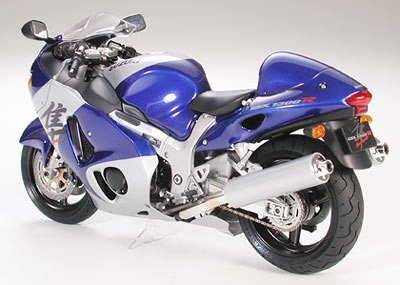 The agressive styling of the Hayabusa are captured with aplomb, and side cowls can be removed after the model is done to show off the detail underneath.
-
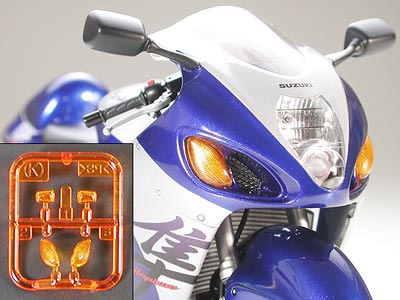 The highly distinctive front lights are rendered realistically in 1/12 scale, including clear orange parts for the turn signals.
-
 A metallic finish sticker is included for the front fork inner tube, while the brake caliper is a particular highlight at the front.
-
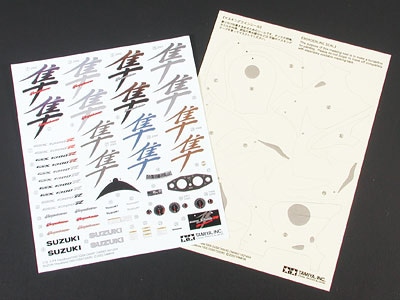 Decals are included to recreate the different Hayabusa logos in use between 1999 and 2002. Masking stickers will help when painting the cowlings.


Information is current as of December 12, 2006. Specifications are subject to change without notice.
-

Tamiya plastic models can be a hobby for a lifetime, and you can get so much more out of the hobby with the tools, paints and finishing materials introduced in this guide.
-

Cars, motorcycles, aircraft, military vehicles, even dinosaurs! You are sure to find a genre to pique your interest in the Tamiya line-up, so come and take a look at the main page for static models on this site.


